65% of K-12 Malware Came From Ads on Legitimate Sites. Ad Blocking Is a Security Control Now.
CIS/MS-ISAC traced 1,159 of 1,796 K-12 malware infections to malicious ads on legitimate websites. Training can't stop a teacher from reading the news. Here is what filter-level ad blocking catches, where it breaks, and three checks for this week.
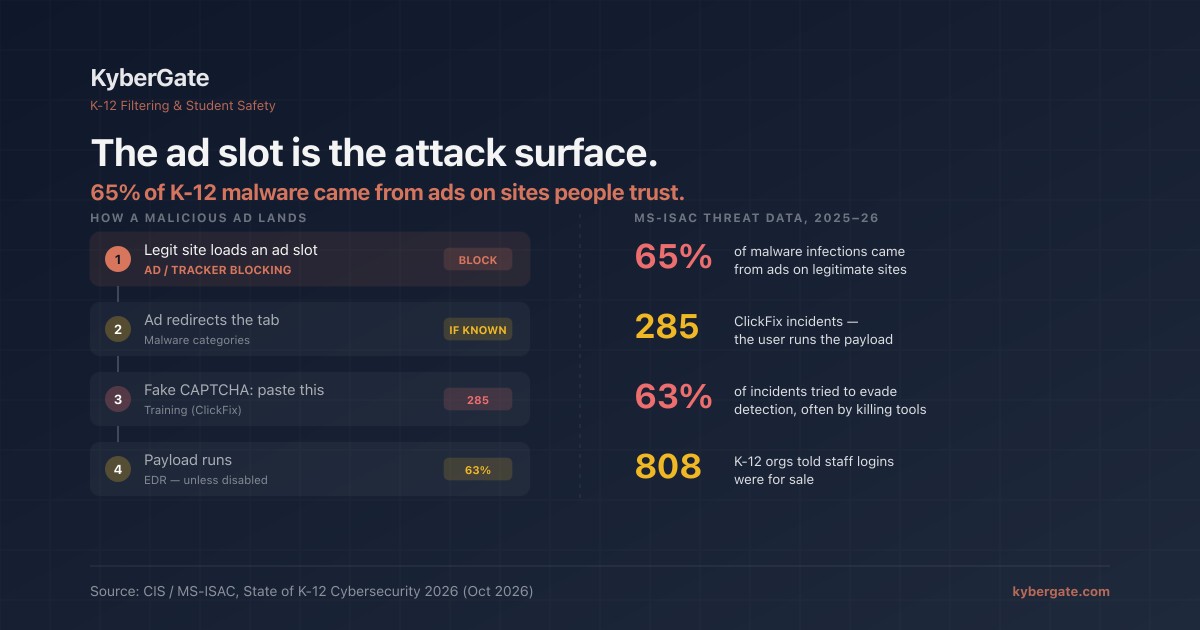
Last week's CIS/MS-ISAC State of K-12 Cybersecurity 2026 report got covered as a phishing story, and we wrote about that part ourselves. But one figure in the threat data deserves its own post, because it points at a control most districts already own and treat as cosmetic.
MS-ISAC looked at 1,796 infections from the ten malware families it sees most often at K-12 members. 1,159 of them — about 65% — traced back to malicious ads on legitimate websites.
Not a phishing email. Not a sketchy download site. A teacher, a secretary, or a student reading a news site, a recipe site, or a homework-help page, and an ad slot on that page delivering the payload.
| Finding (CIS / MS-ISAC, Oct 2026) | Figure |
|---|---|
| Malware infections traced to malicious ads on legitimate sites | **1,159 of 1,796 (≈65%)** |
| ClickFix incidents (lure talks the user into running a command) | 285 |
| Incidents on school devices where attackers tried to evade detection | 1,711 of 2,707 (≈63%) |
| …most often by disabling or modifying security tools | 881 |
| K-12 organizations told their staff credentials were for sale | 808 of 6,116 members |
| Districts with one or two people responsible for cybersecurity | 66% |
Help Net Security's summary put the problem in one line: training built around suspicious messages misses a teacher who picks up malware reading the news.
Why training can't fix this one
Awareness training teaches people to distrust things that look wrong: an odd sender, an urgent tone, a misspelled domain. Malvertising looks right. The page is a site the user visits every week. The ad sits in the same slot ads always sit in. In the worst cases the user doesn't click anything at all — the ad network serves a script that redirects the tab to a fake "your browser needs an update" page or a fake CAPTCHA.
That fake CAPTCHA is usually where ClickFix comes in: the page tells the user to press a key combination and paste a "verification code" into a Run box or terminal. The user is the one running the malware, so nothing in the browser was ever "downloaded." MS-ISAC logged 285 of these.
You can train for ClickFix ("no website will ever ask you to paste into Run"), and you should. But you can't train someone not to read the news. The fix has to be upstream of the person.
Ad blocking is a security control. Configure it like one.
In most school filters, ad blocking lives on a settings page next to SafeSearch and YouTube restrictions, and gets treated as a bandwidth or distraction feature. The CIS number says it belongs in the same row of your audit as phishing and malware categories.
What a network or proxy-level ad blocker actually does: it refuses connections to known ad-serving, tracking, and malicious-ad domains before the page can load them. The ad slot stays empty. The malicious creative never reaches the browser, so the redirect never fires.
| Layer | What it stops | What it misses |
|---|---|---|
| Ad/tracker blocking at the filter | Ad slots served from known ad networks and known bad-ad domains, on every app on the device | First-party ads served from the site's own domain; brand-new ad domains not yet on a list |
| Malware / phishing categories | The landing page the bad ad redirects to, if the domain is known | Fresh domains registered hours ago |
| Endpoint protection (EDR/AV) | The payload once it lands, and ClickFix commands it recognizes | Anything it was disabled before seeing (see below) |
| Training | ClickFix ("never paste a command a website gives you") | Silent redirects; ads on trusted sites |
None of these is sufficient. Together they cover each other's gaps. The ad layer is the cheapest to add, because you are almost certainly already paying for it.
Where honest vendors will tell you it breaks
Ad blocking at the network edge has real costs, and you should hear them from your vendor before you hear them from a teacher:
- Some sites won't render. Pages that wait on an analytics or ad script before drawing can hang. We hit this ourselves at a customer: an assessment form never finished loading because its renderer waited on a monitoring script that the ad list blocked. The fix is a per-domain exemption, not turning ad blocking off.
- Lists are not complete. Community lists (Steven Black hosts, Peter Lowe's list, uBlock Origin's badware and privacy filters) cover tens of thousands of domains and refresh daily, but a new ad domain is invisible until someone lists it.
- It only covers devices in scope. If your filter only covers student devices, the staff laptops in the CIS data are outside it.
Our own version of "visible control, absent enforcement"
We will use our own product as the example, because the failure is common and easy to miss.
Until September 2026, KyberGate's ad-blocking page let an admin pick categories — ads, trackers, analytics, social trackers, crypto-miners — and add whitelist domains. None of those settings saved, and the filter never read them. Only the older single "block ads" switch on a policy actually did anything, and it only covered the ads category. A customer reported that the page wouldn't save. When we traced it, we found the enforcement side was empty too. Both were fixed on September 1 (issue #191), and a later fix (#598) made sure a school's own allow list beats an ad-list block, so an exemption actually exempts.
The point is not that we had a bug. The point is that the page looked fine. Toggles rendered, categories showed as on, nothing errored. If you've never checked your filter's logs for ad-domain blocks, you don't know whether your toggle is wired to anything either.
The other number: attackers turn the console off
In 1,711 of the 2,707 incidents MS-ISAC's SOC analyzed on school-managed laptops, Chromebooks, desktops, and servers — about 63% — the attacker tried to avoid detection. The most common method, seen 881 times, was disabling or modifying security tools.
For a two-person IT team this is the practical takeaway: a device that goes quiet is a finding, not a non-event. An endpoint agent that stops reporting, a filter agent that stops checking in, a device that suddenly shows no traffic — any of these could be a dead battery. It could also be the first step of an incident.
Most dashboards show "last seen." Few people sort by it.
Three checks for this week
Check 1 — Is ad blocking on, and for whom? Open your filter's ad-blocking settings. Write down which categories are on and which groups or devices they apply to. Are staff devices in scope? If the answer is "I'm not sure the page saves," change one setting, reload, and see if it stuck.
Check 2 — Does it fire? On a managed device, load two or three ad-heavy news sites. Then open the filter's logs or reports for that device and look for blocked ad or tracker domains in that window. Expected: dozens of blocks per page. Zero blocks means the setting isn't reaching the device, whatever the toggle says.
Check 3 — Who went quiet? Sort your device inventory (filter, MDM, and EDR) by last check-in. Anything that was reporting daily and stopped in the last week gets a name next to it: dead, lost, reimaged — or unexplained. Unexplained is the one to chase.
Put all three in the same audit table you use for everything else. If you want a template, our filter audit post has one.
Want to see what ad blocking at the proxy catches on your own devices?
Start a free 30-day pilot — we turn on ad and tracker blocking with you, show you the block log from real traffic, and set up exemptions for anything it breaks.
See pricing — per-device, transparent, no hidden fees.
Sources: Center for Internet Security / MS-ISAC, State of K-12 Cybersecurity Report 2026; Help Net Security, Stolen staff logins are spreading attacks between K-12 school districts (Oct 29, 2026).
Frequently Asked Questions
What is malvertising?+
Malvertising is malware delivered through online ads. An attacker buys or compromises an ad slot on a legitimate website, and the ad either redirects the visitor to a malicious page or serves a script directly. The user does not have to visit a suspicious site; a normal news or reference site is enough.
How common is malvertising in K-12 schools?+
Very. In the CIS/MS-ISAC State of K-12 Cybersecurity 2026 report, 1,159 of 1,796 infections from the ten malware families most often seen at K-12 members, about 65%, traced back to malicious ads on legitimate websites.
Can a school web filter block malicious ads?+
Partly. A filter with network- or proxy-level ad and tracker blocking refuses connections to known ad-serving and malicious-ad domains, so the ad never loads. It cannot block first-party ads served from the site's own domain or ad domains no list has caught yet, so it should sit alongside malware categories, endpoint protection, and training.
What is ClickFix?+
ClickFix is a lure, often a fake CAPTCHA or fake browser-update page, that tells the user to press a key combination and paste a command into a Run box or terminal. The user runs the malware themselves. MS-ISAC logged 285 ClickFix incidents at K-12 members. The training message is simple: no legitimate website will ever ask you to paste a command.
Does ad blocking break school websites?+
Sometimes. Pages that wait on an analytics or ad script before rendering can hang. The right fix is a per-domain exemption for that one script, not turning ad blocking off. Make sure your filter's allow list actually overrides an ad-list block, and test it.
How do I check that my school's ad blocking actually works?+
Load two or three ad-heavy news sites on a managed device, then check the filter's logs for that device. You should see dozens of blocked ad or tracker domains per page. Zero blocks means the setting is not reaching the device, whatever the dashboard toggle shows.
Ready to protect your students?
Deploy KyberGate in under 30 minutes. No hardware required.
Request a Demo