87% of Districts Name Phishing Their Top Incident. Your Web Filter Is the Last Hop — Has Anyone Tested It?
The CIS/MS-ISAC State of K-12 Cybersecurity 2026 report is out: 51% of districts had an incident, 87% name phishing. Every working phish ends with a page load through your web filter. What that filter can block, what it cannot, the gap we found in our own phishing category, and three 15-minute tests.
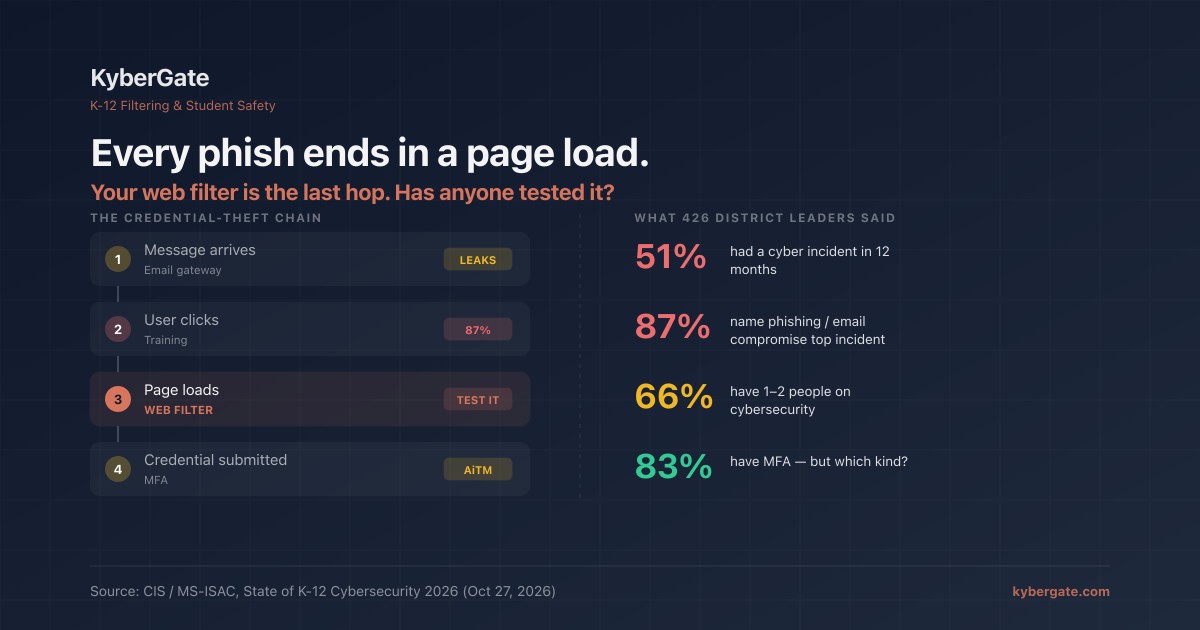
The Center for Internet Security and MS-ISAC published their State of K-12 Cybersecurity report this morning, built on 2025–26 threat data and a survey of 426 district technology leaders run with CoSN. The headline numbers:
| Finding | Figure |
|---|---|
| Schools/districts with a cyber incident in the last 12 months | 51% |
| Incidents that disrupted school operations | 34% |
| Leaders naming phishing or email compromise as a top incident | **87%** |
| Districts with only one or two people responsible for cybersecurity | 66% |
| Leaders who say their security program is underfunded | 56% |
| Leaders who delayed a security project or hire for budget reasons | 70% |
| Districts that have deployed MFA | 83% |
The report's own summary line: "The most targeted system in K-12 today is the human."
Most of the coverage will treat that as an email-security story and a training story. It is both. But every phishing email that works ends the same way: a person on one of your devices opens a URL in a browser, and a page loads that asks for a password. That page load goes through your web filter. The filter is the last automated control between a convincing email and a stolen credential, and in our experience it is the one nobody has ever tested for this job.
Where the filter sits in the chain
A credential phish has four hops. Each one has a control, and each control fails differently.
| Hop | Control | What it misses |
|---|---|---|
| 1. Message arrives | Email security gateway | Anything not sent by email: SMS, Teams/Google Chat, a QR code on a flyer, a compromised vendor account that passes SPF/DKIM |
| 2. User clicks | Awareness training | 87% of leaders just told CIS this hop is still open. Training lowers the click rate; it does not close it. |
| 3. Page loads | **Web filter** | Domains the feed does not have yet; phishing hosted on legitimate platforms |
| 4. Credential submitted | MFA | Push-fatigue and adversary-in-the-middle kits that relay the one-time code in real time |
Hop 3 is the one that costs nothing extra to turn on, because you already pay for it. It is also the one with the least honest vendor messaging, so here is ours.
What a web filter can do about phishing
Three things, and only three.
1. Block domains that are already known to be phishing. Community and commercial feeds list hundreds of thousands of them. A domain that was first reported an hour ago is usually in a good feed by the time the second wave of the campaign hits a different district. For a filter that does full SSL inspection, this works on the whole URL, not just the hostname — which matters when the lure is a path on a shared host.
2. Make the block impossible to undo by accident. Phishing is not a "category" a teacher should be able to allow for a lesson. In KyberGate, phishing is in the set of categories that is blocked for every organization and cannot be allow-listed by any policy at any level — the same set as malware and self-harm content. A site-grant for a teacher's project cannot open it. Every filter has a version of this list; the question is whether phishing is on it and whether you have tried to override it to find out.
3. Fail toward coverage, not toward silence. Feeds are downloaded, and downloads fail. When the phishing feed is unreachable at startup, a filter has to choose between serving the last good copy and serving nothing. The second option looks identical to the first from every dashboard. Our proxies keep the last good list, refuse to replace it with a short one, and report the stale copy on the health endpoint. That is a design decision, and it is one you should ask your vendor to describe in a sentence.
What a web filter cannot do about phishing
Zero-hour domains. A domain registered this morning and used for a single targeted message to your business office is not in any feed. The filter sees a hostname it has never seen and, unless you have configured a block on uncategorized or newly-registered domains (and accepted the false positives that come with that), it allows the page.
Lures hosted on platforms you need. A Google Form, a SharePoint page, a Canva document, a file on a legitimate CDN. The host is allowed because your school runs on it. The filter can see the URL; it cannot see intent. This is where the one-or-two-person security team in 66% of districts gets stretched furthest, because the only response is reporting and takedown, not a block rule.
Adversary-in-the-middle kits. The page is a real-time relay to the genuine login, including the MFA prompt. The 83% MFA figure is good news, but push-approve and SMS-code MFA are exactly what these kits are built to defeat. Only phishing-resistant MFA (FIDO2 keys, passkeys) closes hop 4. We wrote about the migration path in moving from passwords to passkeys.
Traffic that never touches your network. A QR code scanned on a personal phone on cellular, same shape as the smart-glasses problem. Nothing to inspect.
Third-party breaches. The report cites Moody's: 57% of education-sector issuers have suffered a third-party cyber incident since 2020, against 40% across all industries, with PowerSchool (2024) and Canvas (2026) as the examples. No filter on your network reaches a vendor's database. Put that on a different list.
The part where we admit our own failure
We published an audit of our own filter two weeks ago. The theme was a visible control with absent enforcement. Here is the clearest instance we have found, and it is about phishing.
Until 7 September 2026, KyberGate's phishing category was blocked for every organization, unremovable by any policy — and had zero enforceable domains behind it. No feed was wired to it. The embedded fallback database contained a single phishing row, and that row was separated by a space instead of a tab, so the loader dropped it without a log line. The file header said 91,224 entries; the loader loaded 91,224 entries; the count agreed with the file while a row was being discarded.
Armed everywhere. Enforced nowhere. For months.
What fixed it was not a better feed. It was a gate that compares every safety category's live domain count against a floor, fails the health check when a category comes up empty, and refuses to start a proxy on a malformed data file. The phishing feed now loads around 190,000 domains against a floor of 90,000; a fetch that returns fewer is treated as a failed fetch, not a small one.
We mention this because 87% of leaders just named phishing their top incident, and the probability that your filter has the same gap somewhere is not zero. It was not zero for us.
Three tests, fifteen minutes
Run these from a student or staff device on the school network, not from the admin console.
Test 1 — Does the phishing category have anything behind it? Ask the vendor, in writing: how many domains are in the phishing category right now, and what happens on a node where the feed fails to download? A number and a sentence. If either is missing, you have a toggle, not a control. Then confirm on a device with a safe test page from a security-testing organization (AMTSO publishes one), or a domain the vendor nominates — never a live phishing URL.
Test 2 — Can anyone allow it? Log in as a teacher or building-level admin. Try to add a known-phishing domain to an allow list, a site grant, or a class exception. Expected: refused. If it saves, phishing is one helpful teacher away from being off.
Test 3 — Does the block fire inside the apps, not just the browser? Open the test page from a link in Gmail, Google Chat, and a PDF. On iPads this is where DNS-only and extension-based filters go quiet, because the request leaves from an in-app webview the extension does not run in. Our position on this has not changed: the proxy is the only layer that sees every app.
Write the results in the same table as your other audit items. Three rows. That is a real answer to "are we covered on phishing," and it is more than the report's respondents were able to give.
Want hop 3 verified on your network, with the gaps written down?
Start a free 30-day pilot — we run the three tests above on your devices with you and hand you the written results, including what we cannot block.
See pricing — per-device, transparent, no hidden fees.
Frequently Asked Questions
Can a school web filter stop phishing?+
Partly. A web filter blocks phishing domains that are already in a threat feed, and with full SSL inspection it can match the whole URL rather than just the hostname. It cannot block a zero-hour domain that no feed has seen yet, a lure hosted on a platform the school legitimately uses, or a page opened on a personal phone over cellular. Treat the filter as one of four hops — email gateway, training, filter, MFA — and test each one.
What did the CIS and MS-ISAC State of K-12 Cybersecurity 2026 report find?+
Published 27 October 2026 with CoSN, the report found 51% of schools and districts had a cyber incident in the past 12 months, 34% saw operations disrupted, 87% of leaders named phishing or email compromise as a top incident, 66% of districts have only one or two people responsible for cybersecurity, 56% say their program is underfunded, 70% delayed a security project for budget reasons, and 83% have deployed MFA.
Should phishing be a category teachers can allow-list?+
No. Phishing, malware and self-harm content should sit in a set of categories that is blocked for every organization and cannot be overridden by any policy, site grant or class exception at any level. Test this by logging in as a teacher or building admin and trying to allow a known-phishing domain; the expected result is a refusal, not a saved rule.
What happens to phishing protection when a filter's threat feed fails to download?+
It depends on the vendor's design, and you should ask for it in a sentence. The safe behavior is to keep serving the last good list, refuse to replace it with a suspiciously short one, and report the stale copy on a health endpoint. The unsafe behavior is to start with an empty list, which allows every phishing page while every dashboard stays green.
Does MFA make phishing a solved problem?+
No. Push-approve and SMS-code MFA are defeated by adversary-in-the-middle phishing kits that relay the real login page, including the one-time code, in real time. Only phishing-resistant MFA such as FIDO2 security keys or passkeys closes that hop. The 83% MFA adoption figure in the 2026 report is good news, but it does not say which kind.
How do I test whether my school's filter actually blocks phishing?+
Three tests from a student or staff device, not the admin console: ask the vendor in writing how many domains are in the phishing category and what happens when the feed fails; try to allow-list a known-phishing domain as a teacher and confirm it is refused; and open a safe phishing test page from links inside Gmail, Google Chat and a PDF to confirm the block fires in in-app webviews, not only the browser. Never use a live phishing URL.
Ready to protect your students?
Deploy KyberGate in under 30 minutes. No hardware required.
Request a Demo