Two Policies Disagree. Which One Wins?
Most school web filters resolve overlapping policies by merging them, which means any allow beats every block — including a district-level one. Here is how filter resolution order actually works, the scheduling gaps it hides, and the seven questions to ask your vendor.
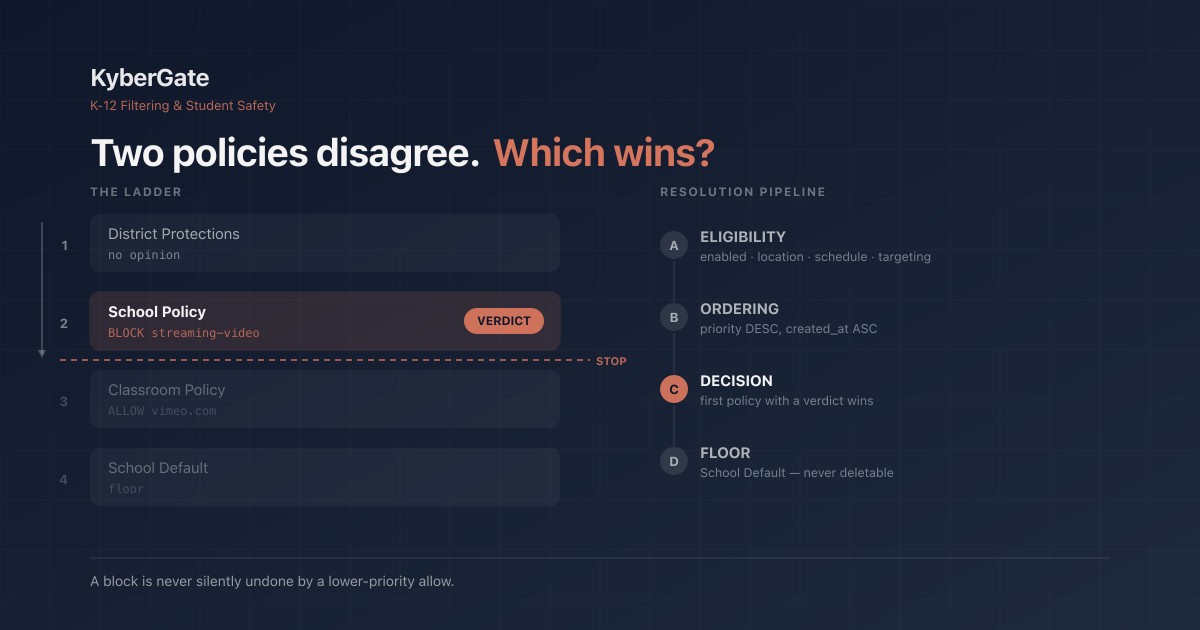
Two policies apply to the same student at the same moment. One blocks a site. The other allows it.
What happens?
Ask your filtering vendor that question directly. Not "can I set priorities" — every vendor says yes. Ask what the resolved answer is, in words, for a concrete collision: a district policy that blocks streaming video, and a classroom policy that allows vimeo.com for a media elective. Then ask where the product shows that answer to the admin before a student hits it.
We spent September rebuilding exactly this layer in KyberGate — the resolution order, the scheduling that feeds it, and the UI that has to make it legible. This is what we learned about how filters decide, and the questions it taught us to ask of any filter, including ours.
The industry default is "the permissive one wins"
Most filtering stacks resolve overlapping policies by merging them. Collect every policy that applies to this user, union the allow lists, union the block lists, then subtract the allows from the blocks. It is the simplest thing to build and it reads as generous: if anybody said yes, it is a yes.
That merge model is where KyberGate started, and it is still the most common design in the category. Written out, it is:
allowed = union of every matching policy's allow list
blocked = union of every matching policy's block list
for domain in allowed: remove domain from blocked
Read that last line carefully, because it says something nobody would agree to out loud: any allow, from any policy, at any priority, defeats every block.
Note what the priority field is doing in that model. Nothing. It can be stored per policy, sorted on read, and rendered as a drag-to-reorder ladder in the UI while contributing exactly zero to the decision. The admin drags a policy to the top. The screen shows it at the top. The resolution step never asks.
That is the failure shape worth learning to recognize across this whole product category: a visible control with absent enforcement. It is not that the feature is missing. It is that the feature is displayed, and the enforcement path does not consult it. From the customer's seat, a control that is drawn but not read is indistinguishable from a control that does not exist.
Why "permissive wins" is the wrong default for K-12
In many access-control systems, allow-overrides is a reasonable convention. In a school it inverts the thing you most need to hold.
Consider the collisions that actually occur in a district:
- District policy blocks
adult-content. A building-level policy allows a specific domain for a health curriculum. Under merge, that narrow allow can pull a domain out of a category block the district believed was non-negotiable. - District blocks anonymizers and proxy sites. A teacher policy written months earlier to unblock one research tool allows a domain that later starts hosting a web proxy.
- A safety-critical category is blocked at the top of the ladder. A stale low-priority policy from a pilot two years ago allows a domain inside it.
In each case the merge model produces an outcome no administrator would have approved if asked. Worse, it produces it silently — no screen anywhere says "your district block was overridden by a lower policy."
The rule we settled on, and now enforce, is this: order decides, not permissiveness. If a higher policy blocks something and a lower policy allows it, it stays blocked. A block is never silently undone by a rule that sits beneath it.
The replacement: four stages, first-match-wins
Resolution is now four stages, in a fixed order, and every enforcement surface — proxy, API, extension-facing endpoints — runs the same four. One resolver, not one per surface.
Stage A — Eligibility. Which policies are in force for this request, right now? Enabled, location gate (on-campus / off-campus / all), schedule gate evaluated in the organization's local time, and targeting (user, OU, group, device). Order is irrelevant here; this stage produces a set.
Stage B — Ordering. Sort that set: priority descending, then creation time ascending. Ties resolve deterministically rather than by whichever row the database happened to return first. This yields the ladder.
Stage C — Decision. Walk the ladder top-down. For each policy, ask a narrower question than "what do you allow and block" — ask "do you have an opinion about this specific request?" A policy with no rule touching the request is silent, and evaluation falls through. The first policy that produces a verdict wins, evaluation stops, and its verdict, its name and its block-page message are what the user sees.
Stage D — Floor. If no policy in the ladder had an opinion, a designated School Default policy applies. If none exists, the organization's fail mode does.
The word doing the most work is silent. Merge models have no concept of a policy abstaining — which is exactly why they must merge. With no abstention, every policy is always voting on everything.
The part that trips everyone: specificity inside a policy vs. across policies
Within a single policy, a more specific rule beats a less specific one. Our order, first hit wins:
- Path-scoped block —
example.com/games/* - Path-scoped allow
- Exact or wildcard domain block —
tiktok.com,*.tiktok.com - Exact or wildcard domain allow
- TLD rule —
*.io - Category block or category allow
- Otherwise: silent, fall through to the next policy
So inside one policy, an explicit allow for vimeo.com beats that same policy's streaming-video category block. That is what an admin means when they write both.
Across policies, specificity does not travel. A low policy's domain-level allow never beats a high policy's category block. Ladder position outranks specificity, always.
That distinction is the most common source of "the filter did something I didn't expect," and it is worth asking any vendor to state it in one sentence. If they cannot, the resolution order is probably emergent rather than designed — which means it can change silently the next time someone refactors.
Scheduling: four failure modes nobody finds until a Tuesday morning
Precedence is only half of it. Stage A decides which policies are eligible at all, and that is where time lives. These four generalize well beyond our codebase, and you can check most of them against your current filter this week.
1. Adjacent schedules leave gaps that look like coverage
An admin writes two policies that obviously cover the whole day:
Policy 1: on-campus   08:00 → 17:00
Policy 2: off-campus  17:00 → 07:30
Time windows should be half-open — start inclusive, end exclusive — because that is what makes adjacent windows hand off with no overlap and no double-application. It also means 07:30:00 to 07:59:59 has no policy in force. Thirty minutes, every weekday morning, arriving exactly when students do.
The gap is not a bug in either policy. Both are exactly what the admin typed. It is a failure of a UI that accepts two time windows and never renders what they add up to. The answer is not a smarter default — it is a 24×7 coverage strip showing which policy owns each minute of each weekday, naming uncovered spans in plain English: "Weekdays 07:30–08:00: no policy applies. The School Default will be used."
The same hole appears across weekends. Two mon–fri policies leave Saturday morning through Monday morning undefined, and nobody notices until a take-home device is used on a Sunday.
Ask your vendor to show you coverage, not schedules. Any product can show you what you typed.
2. A missing timezone silently shifts the entire school day
If a schedule evaluator falls back to server time when an organization has no timezone configured, and the servers run UTC — which they usually do — then an 08:00–17:00 window on an org with no timezone evaluates as 04:00–13:00 Eastern.
The school's entire morning falls outside the window. Afternoon classes get evaluated under the evening policy. And nothing reports an error, because from the software's point of view it successfully evaluated a schedule.
The correction is blunt: an organization timezone must be required before a schedule can be saved, and any existing org with a schedule and no timezone must be flagged loudly. Silently substituting server time is never acceptable — a time-based rule with an unstated timezone is not a rule.
Daylight saving deserves the same scrutiny. An overnight window crossing a transition hits an hour that occurs twice or never. Evaluate in the organization's timezone and test both transitions: a repeated hour must not double-apply, a skipped hour must not un-apply.
3. Never let the device decide what time it is
If schedule enforcement on a managed device derives "now" from the device clock, a student who changes the clock moves themselves outside school hours and filtering stops. No exploit, no extension, no VPN — the Settings app.
This is an easy pattern to introduce by accident, because on a browser extension or a device agent, new Date() is right there and looks authoritative. It is not. It is user input.
The rule: schedule verdicts are computed server-side and delivered to the device as a resolved state with a short time-to-live. Ours is 300 seconds, clamped server-side so a misconfigured value cannot extend how long a device coasts on a stale verdict. Clock skew beyond tolerance — ours is 120 seconds, comfortably above normal consumer drift and far below the hours needed to escape a school-day window — fails toward filtering. A device that has lost contact filters. It does not coast into openness.
Any client-side time check is a self-service bypass. Ask specifically where school-hours time is computed, on every platform the vendor supports.
4. Decide which direction a mismatch fails
A concrete one, worth generalizing: a schedule stored with day names as "monday", and a window matcher expecting "mon". The unmapped day matches nothing, which reads as "outside the window," which means no policy in force — failing open rather than closed. One string format, two components, no shared constant.
The lesson is not "normalize your strings." It is that the direction an unrecognized value fails in is a design decision you have to make on purpose. In a filtering path, an unrecognized value should fail toward filtering. It usually does not, because nobody decided it should.
The floor: what happens when nothing matches
Under a merge model, "no policy matched" is soft — the union of nothing is empty, defaults absorb it, nobody notices. Under first-match-wins it is the whole ballgame. If the ladder produces no verdict, something has to.
So the School Default becomes a required object rather than a nice-to-have:
- Every organization has exactly one policy flagged as default.
- It is pinned to the bottom of the ladder and cannot be dragged off it.
- It cannot be deleted, and cannot be disabled while devices are enrolled.
- Its targeting is forced to "everyone" — a default that targets a subset is not a floor.
- A first visit to the policy manager with no default triggers guided creation that cannot be skipped.
If your filter can reach a state where zero policies apply to an enrolled device, find out today what it does in that state. "Whatever the fail mode says" is an acceptable answer only if someone chose the fail mode deliberately.
Changing resolution order is a customer-visible event
Here is the part that makes this genuinely hard, and the part worth pressing any vendor on.
Switching from "permissive wins" to "order wins" does not only block more things. It can also unblock a site that a lower-priority policy had been blocking — because under first-match-wins, a higher policy's allow stops evaluation before that lower block is ever reached. At every school, simultaneously, the moment it flips.
A filtering vendor that changes resolution semantics in a routine release is doing something reckless, even when the new semantics are more correct.
How we gated ours:
- The precedence resolver ships behind a flag, default off, byte-identical behavior when off.
- Before any organization is switched, we generate a per-organization diff against that org's real observed traffic: which decisions change, in both directions, with newly-unblocked domains reported separately and loudly.
- No organization is flipped without a human reading its diff first.
- Existing organizations are backfilled with a School Default seeded from what their current configuration actually enforces today, so the flip is a no-op for them rather than a surprise.
- The diff is built from read-only aggregate queries — no per-student rows, no browsing histories. You can answer "what changes" entirely from domain-level counts, and student data in K-12 is radioactive. CIPA, COPPA and FERPA all apply to exactly this kind of analysis.
If a vendor cannot tell you what a policy-engine change will do to your district before it does it, the honest reading is that they do not know either.
Some rules must sit outside the ladder entirely
Not every decision belongs in the precedence order. Four we hold above or below it on purpose:
| Surface | Where it sits |
|---|---|
| Teacher / classroom override | **Above** the entire ladder. A teacher taking control of a live class outranks configuration. |
| Approved-Sites-Only (whitelist) mode | If the winning policy is whitelist-mode, only *its* allow list counts. Allows are never merged in from other policies. |
| District forced protections | Applied **after** the ladder. A school-level policy cannot unblock what the district forces. |
| Self-harm and safety signals | Never suppressible by policy order. A wellness alert is not a filtering decision and does not lose to one. |
That last row is the one to be inflexible about, and it extends to the exceptions surface. Some categories should not be allow-listable by anyone, in any organization, at any priority — adult content, self-harm, violence, weapons. Others reasonably stay exceptable, because the use case is real: health curriculum needs to reach material filed under drugs and alcohol.
Two things matter about that list. It has to be enforced in the API, not only hidden in the UI — a control removed from a screen but still reachable by request is not a guard. And it needs a test that fails if the guard is bypassed, because a protected-categories constant that nothing imports is exactly as protective as no constant at all.
CIPA is a floor, not a setting.
What to ask your vendor — or your own configuration
Whether you are evaluating a filter or auditing the one you already run:
- "Two policies apply and disagree. Which wins, in one sentence?" If the answer is "the more permissive one" or "it depends," ask what a district-level block is actually worth.
- "Show me coverage, not schedules." Ask for a view of which policy owns each minute of a weekday. Look at the start of the day, the end of the day, and Saturday.
- "Is the organization timezone required?" If a schedule saves without one, ask what timezone it uses instead and what happens when that is wrong.
- "Where is school-hours time computed?" If any part of the answer involves the device clock, a student with Settings access can leave school hours.
- "Which categories cannot be excepted, by anyone?" There should be a list, enforced in the API, covered by a test.
- "What changes in my district if you change your policy engine?" Ask for a diff, beforehand, in both directions.
- "What happens when no policy matches?" There should be a named floor, and it should be impossible to delete.
Questions 2, 3 and 7 you can run against your current filter this afternoon without involving anyone. If you find a morning coverage gap, you found it before a parent did.
Bottom line
Filtering vendors compete on category coverage and block rates. Those are the easy numbers. The hard part — the part that decides what actually happens to a student at 7:45 on a Tuesday — is resolution: which rule wins, in what order, evaluated in whose timezone, and what happens when nothing matches at all.
The merge model that most of this category still runs on answers that question badly, and answers it invisibly. A priority ladder that is drawn but never consulted is worse than no ladder, because it buys confidence it has not earned.
The standard we hold ourselves to is narrow and testable: a toggle that is on blocks the thing named on the toggle, and a block is never silently undone by a rule beneath it. Everything above is what it took to be able to say that honestly.
KyberGate enforces policy precedence at the network layer through a cloud proxy with full SSL inspection — which is why it holds on take-home iPads, where device-resident filters and client-side schedule checks come apart.
Related Reading
- We Audited 1,300 Unblock Requests. The Filter Was Wrong 16% of the Time.
- Six States Limit Screen Time. Your Filter Is What Tells the Difference.
- NYC and LA Banned Student AI. Your Filter Is What Decides If That's Real.
- CIPA Compliance Checklist 2026
- Web Filtering for a 1-to-1 iPad Program
- Start a free 30-day pilot
Frequently Asked Questions
When two school web filtering policies disagree, which one wins?+
It depends entirely on the filter's resolution model. Most filtering stacks merge overlapping policies: they union every matching policy's allow list and block list, then subtract the allows from the blocks. Under that model any allow, from any policy, at any priority, defeats every block — including a district-level block. KyberGate uses first-match-wins resolution instead: eligible policies are ordered by priority descending then creation time ascending, and the first policy that has an opinion about the request wins. A block is never silently undone by a lower-priority allow.
What is first-match-wins policy resolution?+
First-match-wins evaluates policies in four stages. Stage A determines eligibility: enabled status, location gate, schedule gate in the organization's local time, and targeting by user, OU, group or device. Stage B orders the eligible set by priority descending then creation time ascending. Stage C walks that ladder top-down and asks each policy whether it has a verdict for this specific request; a policy with no rule touching the request is silent and evaluation falls through to the next. The first verdict wins and evaluation stops. Stage D applies a School Default policy if no policy in the ladder produced a verdict.
Why do adjacent filtering schedules leave coverage gaps?+
Time windows are half-open, meaning the start time is inclusive and the end time is exclusive, which is what lets adjacent windows hand off with no overlap or double-application. Two policies covering 08:00 to 17:00 and 17:00 to 07:30 therefore leave 07:30:00 through 07:59:59 with no policy in force — thirty minutes every weekday morning, arriving exactly when students do. Two weekday-only policies also leave Saturday morning through Monday morning undefined. The fix is a 24x7 coverage view that shows which policy owns each minute and names uncovered spans explicitly.
Can students bypass school hours filtering by changing the device clock?+
Yes, if the filter derives the current time from the device clock. A schedule check that calls the local system clock on a browser extension or device agent treats user-controlled input as authoritative, so a student can change the clock in Settings and move themselves outside school hours. Schedule verdicts should be computed server-side and delivered to the device as a resolved state with a short time-to-live, with clock skew beyond tolerance failing toward filtering rather than away from it. A device that has lost contact should filter, not coast.
What happens if a school's organization timezone is not configured?+
If the schedule evaluator falls back to server time and the servers run UTC, an 08:00 to 17:00 window evaluates as 04:00 to 13:00 Eastern. The school's entire morning falls outside the window, afternoon classes are evaluated under the evening policy, and no error is reported because the software believes it evaluated the schedule successfully. An organization timezone should be required before any schedule can be saved, and existing organizations with a schedule and no timezone should be flagged loudly.
Should a filtering vendor change its policy resolution order in a routine release?+
No. Switching from a permissive merge model to order-based resolution does not only block more things; it can also unblock a site that a lower-priority policy had been blocking, because a higher policy's allow now stops evaluation before the lower block is reached. That change lands at every school simultaneously. A safe rollout ships the new resolver behind a flag that is off by default with byte-identical behavior when off, generates a per-organization diff against real observed traffic showing which decisions change in both directions, and requires a human to read that diff before any organization is switched.
Ready to protect your students?
Deploy KyberGate in under 30 minutes. No hardware required.
Request a Demo