Alert Fatigue Is the Real Failure Mode of Student Safety Monitoring
In one deployment, 60 of 86 unreviewed safety alerts were inbound newsletters — and one student's three 'escalating' flags were all sports email. Coverage is the easy part. Here's what actually determines whether your counselors still believe the queue in October.
Three weeks before students come back, most K-12 safety monitoring conversations are about coverage: which platforms get scanned, which categories get flagged, how fast an alert reaches a counselor.
Almost nobody asks the question that actually decides whether the system works: when a counselor opens the alert queue in October, will they believe what's in it?
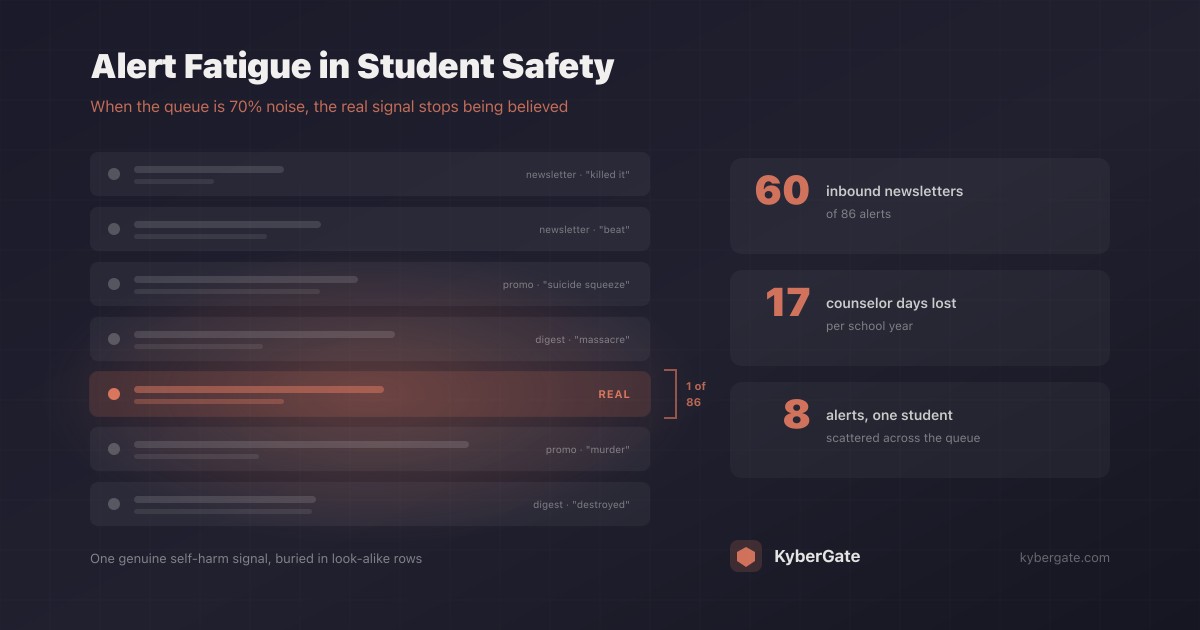
We have production data on this, and it is not flattering. Over a six-week stretch, one deployment of ours generated 86 unreviewed email-based safety alerts. When we broke them down by who actually wrote the flagged text, 60 of the 86 were inbound newsletters. Not student writing. Marketing email.
That is the real failure mode of student safety monitoring. Not missed detections — unbelievable detections.
The anatomy of a false positive that looks exactly like a crisis
Here is a real case from our own system, with identifying details removed.
One student accumulated three unreviewed alerts over 17 days:
critical— violence-threatshigh— cyberbullyingcritical— self-harm
Read that list as a counselor. Three escalating flags on one child, spanning violence, bullying, and self-harm. That is the pattern you are trained to treat as an emergency.
All three were sports newsletters.
Sports writing is saturated with exactly the vocabulary safety classifiers are built to catch: a team killed it, a pitcher beat the lineup, a suicide squeeze in the seventh, a massacre in the fourth quarter. A keyword classifier scanning a student's inbox cannot tell the difference between a child in distress and The Athletic's daily digest.
The damage is not the wasted click. The damage is that this is the counselor's first experience with the tool. Session one teaches them the queue is noise.
Why "the student received it" matters enormously — and why you must not simply suppress inbound
The instinct is to stop scanning inbound mail. Do not do that. A student receiving "kill yourself" is precisely the cyberbullying case the product exists to catch. Suppressing inbound would blind you to the highest-severity peer harassment you will ever see.
The useful distinction is not inbound vs. outbound. It is bulk commercial sender vs. person-to-person.
A message from e1.theathletic.com or lifecycle.quizlet.com carrying a List-Unsubscribe header and a marketing subdomain is a fundamentally different object than a message from another student at your own domain. The signal is already sitting in the message. Most systems just do not use it.
What to ask a vendor: "If a student receives a marketing email containing the word 'suicide,' does that generate a critical alert? Show me."
Alert fatigue is not a soft problem. Here is the arithmetic.
Alert fatigue gets discussed as a morale issue. It is actually a math problem with a predictable failure point.
Assume a 1,000-student deployment where the system produces 15 flags per school day, and that 70% are false positives.
| Metric | Value |
|---|---|
| Flags per school day | 15 |
| False positives (70%) | 10.5/day |
| Genuine flags needing action | 4.5/day |
| Flags per 180-day school year | 2,700 |
| False positives per year | 1,890 |
| Minutes to triage at 3 min each | 8,100 min (135 hours) |
| Counselor workdays consumed | ~17 full days |
Seventeen working days of a counselor's year, spent reading marketing email — to find the 4.5 real signals per day already buried in it.
But the cost that matters is not the 135 hours. It is the behavioral shift. When a queue is 70% noise, humans do not triage more carefully. They start batch-dismissing. And the moment batch-dismissal becomes the habit, your false negative rate stops being a property of your classifier and becomes a property of your reviewer's exhaustion.
A safety system with a 99% detection rate and a 70% false positive rate is not a 99% safety system. It is a 99% detector wired to a human who has learned to ignore it.
The pattern problem: 8 alerts on one child look like 8 unrelated rows
There is a second, subtler failure that has nothing to do with false positives — and I walked straight into it myself.
I spent two days tracking what I believed were four self-harm alerts at one school. I had filtered the queue by category. When I widened the query, the actual picture was eight interleaved cyberbullying and self-harm alerts on a single student over two weeks.
Same data. Completely different clinical meaning. Alternating bullying and self-harm flags on one child is not eight incidents — it is one escalating situation with a plausible causal chain.
I found that error with direct database access and time to run queries. A counselor with a dashboard and 20 minutes between appointments will not find it.
Most safety queues — including ours, until we fixed it — sort alerts by timestamp. That single design decision is enough to hide the most important pattern in the data, because a time-ordered list scatters one student's history across dozens of unrelated rows.
What a queue must do instead
- Group by student, not by time. "Student X — 8 alerts, 4 self-harm, 3 cyberbullying, since Sept 12" is a sentence a counselor can act on. Eight timestamped rows are not.
- Order by severity, not recency. The worst case is rarely the newest one.
- Flag category combinations explicitly. Self-harm plus cyberbullying on one student deserves its own visual marker. Do not make a human notice the intersection.
- Put the pattern above the list. A pattern you have to click a tab to find is a pattern you will miss.
- One click to a student's full timeline.
What to ask a vendor: "Show me the screen where I see that these six alerts are the same child." If the answer involves searching or exporting to a spreadsheet, the tool will lead your counselors to the same wrong conclusion it led me to.
Evidence: the alert nobody can act on
The third failure is the quietest. An alert can be perfectly true, correctly routed, and still worthless — because it does not say why it fired.
We found 40 alerts in our own system marked urgent where the evidence fields were empty. No search query. No URL. No matched term. A counselor opening one saw a severity, a device name, and nothing else.
There is no way to judge that. There is no way to dismiss it either — dismissing it means asserting a negative you cannot see. So it sits in the queue forever, and the queue count climbs, and the number stops meaning anything.
Worse, "read the flagged content" is often not an acceptable remedy. Reading a minor's email or documents to adjudicate an alert is a genuinely invasive act with CIPA, COPPA, and FERPA implications. A monitoring system should never require a human to violate a student's privacy in order to dismiss a false positive.
The fix is to persist and surface the classifier's own reasoning: the matched term, the confidence score, the sender, the category. An alert that says "flagged on the phrase 'massacre' in an email from marketing.mlbemail.com" is dismissible in two seconds without anyone reading a child's mail.
What to ask a vendor: "When an alert is wrong, how does my counselor establish that without reading the student's private content?"
Human review does not solve this, and it costs you latency
The standard answer to false positives is a 24/7 human review team — the model Bark, Securly, and GoGuardian Beacon use. It genuinely reduces the noise reaching your staff. But it introduces a tradeoff vendors rarely quantify.
| AI-only triage | Human review layer | |
|---|---|---|
| Latency to counselor | Seconds | 20–40 minutes typical |
| False positives reaching school | Higher | Lower |
| Cost | Included in platform | Usually a premium tier |
| Scales with volume | Yes | Queues during spikes |
| Who sees student content | Automated system | Third-party contractors |
That last row deserves more attention than it gets. Outsourced review means a vendor's contractors are reading your students' writing. That is a defensible choice, but it is a choice — and it belongs in your board conversation and your parent-facing privacy documentation, not buried in a subprocessor list.
Our position: fix the classifier's precision rather than paying humans to absorb its imprecision. Better sender heuristics, matched-term evidence, and per-student aggregation remove more noise than a review queue does, without adding 20–40 minutes to a self-harm alert or putting a contractor in front of a child's documents.
The routing problem nobody checks
One more thing worth auditing before September, because it is invisible until it matters.
Where do your safety alerts actually go?
Most platforms fall back to the organization's admin email when no dedicated contact is configured. Nobody sets the dedicated contact, because nothing ever asks. The predictable result: self-harm alerts about named minors landing in an IT director's inbox.
We measured this in our own deployment. In one week, 36 safety alerts — including self-harm and sexual-content criticals — were delivered to a single IT administrator's email address. Not because of a bug. Because no counselor contact had ever been configured, and the fallback did exactly what it was designed to do, silently.
That IT director is not clinically trained, is not the right responder, and in many districts should not be receiving that content at all.
Audit checklist, 10 minutes:
- Open your monitoring platform's notification settings. Is a named counselor listed — not a distribution list, not the admin account?
- Is there an SMS or push path for critical severity? Email alone fails after 4 PM, on weekends, and over the summer.
- Who covers nights, weekends, and breaks? Crisis content does not respect the school calendar.
- Send a test alert and confirm a human receives it, on the device they actually carry.
- Ask your vendor: can an organization enable safety monitoring with zero contacts configured? If yes, that is a provisioning defect, and you are one unset field away from alerts going nowhere.
Consent is not a configuration flag
A related trap, learned the hard way: an enabled setting is not evidence of consent.
Scanning student email and documents is a materially different product from web filtering, and some schools decline it deliberately — for sound pedagogical and community reasons. If your platform's default is "on," then "on" tells you nothing about what the school agreed to. If the default is "off," a school that expected scanning is silently unprotected.
Keep a written ledger of which schools affirmatively agreed to content scanning, separate from the system's own toggles. Reconcile the two before each school year. The database records the state; only your records establish the agreement.
The four questions to ask before September
If you take one thing from this: coverage is the easy part. Every vendor in this market will scan Gmail, Drive, and browsing. The differences that determine whether your monitoring survives contact with a real counselor's calendar are all downstream of detection.
- Precision. If a student receives a marketing email containing "suicide," does that generate a critical alert?
- Aggregation. Show me the screen where I see that these six alerts are the same child.
- Evidence. When an alert is wrong, how does my counselor establish that without reading the student's private content?
- Routing. Who receives a critical self-harm alert at 9 PM on a Saturday in July, and on what device?
A vendor who answers all four well is selling a safety system. A vendor who only wants to discuss detection rates and category counts is selling a detector — and leaving the hard half of the problem in your counselor's inbox.
The goal was never to generate more alerts. It was to make sure that the one alert that matters is still believed when it arrives.
Related Reading
- Why Human Review is a Bottleneck in Student Safety
- Beyond Web Filtering: KyberPulse Student Safety Monitoring
- How to Talk to Parents About Student Safety Monitoring
- Student Mental Health Monitoring in Schools: A Complete Guide for 2026
- How Schools Are Using AI to Detect Cyberbullying Before It Escalates
- Bark vs KyberPulse: Student Safety Monitoring Compared
Ready to protect your students?
Deploy KyberGate in under 30 minutes. No hardware required.
Request a Demo