Google Search Goes Dark for K-12 Students in January. The AI Comes Back With It.
Google will turn Search off for K-12 student accounts by default, but schools that turn it back on get AI Overview and AI Mode with no way to remove them. Here is the third option, where it breaks, and three checks before January.
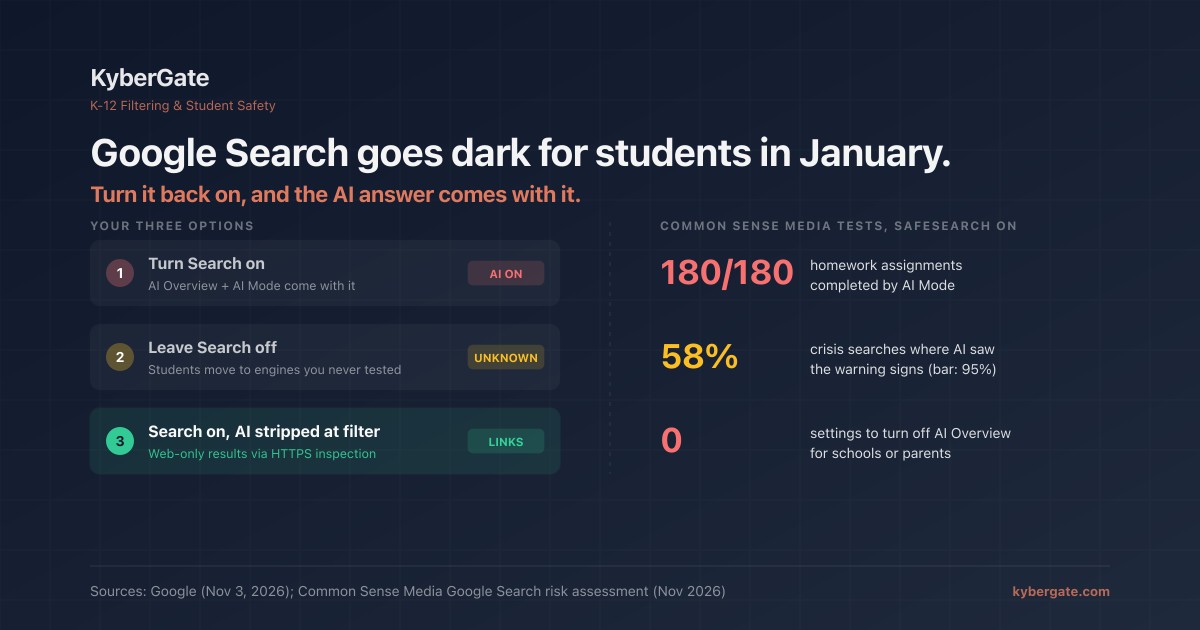
On November 3, Google said that Search, Gemini, Gemini Notebook and Gemini in Classroom will be "entirely off for K-12 student accounts until school administrators explicitly turn them on." EdSource reports the change starts in January.
That sounds like the control schools asked for. Read the follow-up and it is narrower than that. Google clarified on X that schools can turn Gemini off and keep Search, but AI Overview and AI Mode stay built into Search. There is no student setting for Google Search without the AI answer on top. Google's education VP Chris Phillips put it plainly in a press briefing: if a school "simply wants AI off, then they have the choice to not have Search on at all."
So in January, every Google Workspace for Education district makes a choice it did not ask for: AI search, or no Google search. This post is about the third option most people are missing, what it can and cannot do, and three things to test before January.
| What changes | Detail |
|---|---|
| Products off by default for K-12 student accounts | Google Search, Gemini, Gemini Notebook, Gemini in Classroom |
| Who can turn them back on | School administrators |
| When | January 2027 (EdSource); Google says specifics "in the coming months" |
| Can Search be on with AI Overview / AI Mode off? | **No.** Google: AI Overview and AI Mode remain integrated in Search |
| Control by grade, school or student? | Unclear. Not yet published (K-12 Dive) |
| Guided Learning in Search | Pilot in select U.S. schools later in November |
Why districts care about the AI layer at all
This is not abstract. The same week, Common Sense Media published a risk assessment of Google Search and gave it its lowest rating, "Unacceptable Risk." Its researchers ran more than 2,600 searches from accounts set up for 11- and 15-year-olds, with SafeSearch on.
| Common Sense Media finding (Nov 2026) | Result |
|---|---|
| Homework pasted into Search, completed by AI Mode | **180 of 180** |
| Same history question, materially different AI answer | 43% of the time |
| AI citations from user-generated sites (Reddit, Facebook, YouTube, forums) | 29% of 2,100 |
| Crisis searches where AI Overview recognized clear warning signs | **58%** (their bar is 95%) |
| Setting to turn off AI Overview or AI Mode for parents or schools | None |
The last row is the real story. SafeSearch was on for every one of those tests. SafeSearch filters explicit results. It was never designed to judge an AI-written answer to a child who types that they feel better after they vomit.
Districts reacted fast. New York City paused student-facing AI in elementary and middle school this year, and Los Angeles Unified paused it districtwide. InnovateEDU's new model policy for pre-K to grade 5 says generative AI features should be off by default. Google's change gives those districts an off switch for Gemini. It does not give them one for the AI answer inside Search.
The three options in January
Option 1: Turn Search on. Students get Google Search back, with AI Overview and AI Mode. Nothing changes from today, including the results above.
Option 2: Leave Search off. No AI answers from Google. But students still need to look things up, so they move to another engine. Many of the alternatives now put their own AI answer on top too, and each one needs its own SafeSearch lock. You have traded one known problem for several you have not tested.
Option 3: Turn Search on, and strip the AI layer at the network. Google has a "Web" results tab that shows plain links with no AI Overview. A filter that inspects HTTPS traffic can rewrite every student search to that tab before the request reaches Google. The student searches normally and gets a list of links.
Option 3 is not a Google feature. It is a filter feature, and it only works where your filter actually sees the traffic. That is the catch, so here is the honest version.
What a filter-level "Web only" rule does, and where it breaks
What it does. On a managed device, a search for "how do volcanoes form" comes back as ten blue links. No AI Overview at the top. A student who opens AI Mode is sent back to web results. Images, Videos and News tabs still work.
What it needs. HTTPS inspection on the device, through a proxy, on-device agent or browser extension. A DNS-only filter cannot do this: it sees www.google.com, not the search URL, so it can block Google or allow it, nothing in between.
Where it breaks. We learned three of these the hard way, in our own product:
- Over-forcing breaks the tabs. Our first version rewrote every search to web-only. Students clicked Images or Videos and nothing happened, because the filter sent them straight back to the Web tab. A school reported it. Fixed August 17: real tab clicks are left alone.
- AI Mode used the same door. Google signals both its content tabs and AI Mode through the same URL parameter. Our fix for the tabs treated any tab value as a student's choice, so AI Mode looked like a tab click and passed straight through. The console showed "Disable AI Overview" as ON while it enforced nothing on AI Mode. A customer caught it. Fixed September 4: only tabs we recognize are allowed through. Anything unrecognized is forced to web-only. Unknown is treated as unsafe.
- Google can change the rules. The "Web" tab code is not documented by Google. It has changed before and will change again. A filter vendor that does this has to test it continuously, not once.
The lesson from #2 applies to every vendor, not just us: a dashboard toggle is a claim, not a control. Test it from a student device.
What it does not cover. A filter-level rule does nothing for the Gemini app itself; that is a separate domain you allow or block by category, and Google's new default will now turn it off for students anyway. It does not cover Guided Learning, which is new and which nobody outside the pilot has tested. And it does not cover unmanaged devices at home that never route through your filter.
Search is also a safety signal
One more reason not to pick Option 2 by default. When a student types something worrying into a search box, that query is one of the earliest signals a school ever gets. Common Sense found the AI answer missed clear warning signs 42% of the time. A student-safety system that reads the query, not Google's answer, does not depend on the AI getting it right. Push students onto an engine your monitoring was never set up for, and you lose that signal along with the AI.
Three checks before January
Check 1: Who counts as a student? Google's change applies to "K-12 student accounts." Find out exactly which of your accounts Google will treat that way, and which org units or groups you will be able to turn Search back on for. Teachers and staff testing from their own accounts will not see what students see.
Check 2: Does "web only" actually hold? On a managed student device, signed in as a student:
- Search something ordinary. Expected: no AI Overview, and the URL carries the web-results parameter.
- Open AI Mode directly. Expected: you land on plain web results.
- Click Images, then Videos. Expected: both work. If they bounce back to Web, the rule is over-forcing.
Check 3: Where would students go instead? Pick the two engines students are most likely to use if Google Search goes dark, and run the same test there: SafeSearch locked on, and whatever AI answer layer it has, either removed or blocked by your policy. If you can't answer that today, you are not ready to leave Search off.
Put all three in the same audit table as everything else. Our filter audit post has a template, and our SafeSearch guide covers the alternative engines. If your district is already enforcing an AI ban, this walkthrough covers the rest of the AI surface.
Want Google Search on in January without the AI answer on top?
Start a free 30-day pilot — we turn on web-only Google results with you and run all three checks on your own devices.
See pricing — per-device, transparent, no hidden fees.
Sources: Google, Designing responsible AI for learning (Nov 3, 2026); K-12 Dive, Google will turn off its search engine for schools by default. Is it an AI 'ultimatum'? (Nov 5, 2026); EdSource via The 74, New AI 'Ultimatum' Sparks Concern Over Google's Power in California Schools; Common Sense Media, Google's AI Search is failing kids, and parents can't turn it off.
Frequently Asked Questions
Is Google turning off Search for students?
Yes, by default. On November 3, 2026 Google said Google Search, Gemini, Gemini Notebook and Gemini in Classroom will be off for K-12 student accounts until a school administrator turns them on. EdSource reports the change begins in January 2027.
Can schools turn on Google Search without AI Overview?
Not through Google's own settings. Google clarified that AI Overview and AI Mode remain integrated in Search, so a school can turn Gemini off and Search on, but Search comes with the AI answer layer.
How can a school remove AI Overview from Google Search?
A web filter that inspects HTTPS traffic on the device can rewrite student searches to Google's Web results tab, which shows plain links without AI Overview, and send AI Mode requests back to web results. DNS-only filtering cannot do this because it never sees the search URL.
Does SafeSearch block AI Overview?
No. SafeSearch filters explicit results. Common Sense Media ran its 2,600-search assessment with SafeSearch on, and AI Overview and AI Mode still appeared and still completed homework 180 out of 180 times.
What should we test before the change rolls out?
Three things: which accounts Google will treat as K-12 student accounts and where you can re-enable Search, whether a web-only rule really holds on a student device (no AI Overview, AI Mode redirected, Images and Videos tabs still working), and whether SafeSearch and AI controls are locked on the alternative engines students would move to.
Should we just leave Google Search off?
Think it through first. Students will still search, usually on another engine with its own AI answers and its own SafeSearch settings. If your filtering and student-safety monitoring were set up around Google, leaving it off can lose coverage rather than add it.
Ready to protect your students?
Deploy KyberGate in under 30 minutes. No hardware required.