A Safety Alert Reached a Counselor Who Left 9 Months Earlier. Audit Your Recipient List.
In a new lawsuit against Google, a student's parents were warned by a counselor who had left the school nine months before but still got monitoring alerts. Routing failures look like success. Two gaps we found in our own product, and a 20-minute recipient audit.
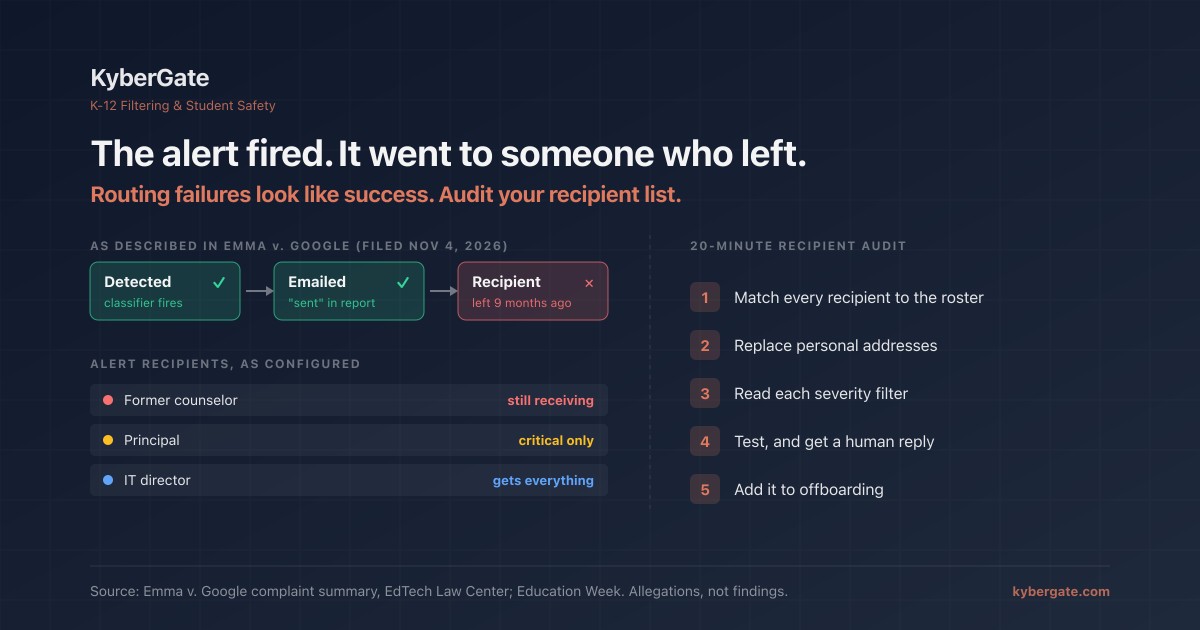
A new lawsuit against Google has a detail in it that every school running safety monitoring should read twice.
On November 4, the EdTech Law Center and Qureshi Law filed Emma v. Google in Santa Clara County Superior Court. The complaint alleges that a 13-year-old used Gemini-powered AI Mode on her school-issued Chromebook for months, and that the chatbot fed a mental health crisis that nearly ended in suicide. Those are allegations. Google has not yet responded in court, and this post does not take a side on them.
The detail we mean is about how the adults found out. According to the filing, her parents were alerted by a former counselor who had left the school nine months earlier but was still receiving alerts from the school's misconfigured monitoring software.
The monitoring worked. The detection worked. The alert went to someone who no longer worked there. In this case that person still chose to act. You cannot plan on that.
| What the complaint and coverage describe | Source |
|---|---|
| Filed November 4, 2026, Santa Clara County Superior Court | EdTech Law Center |
| Student was 13, using a school-issued Chromebook | Education Week, Nov 2026 |
| AI Mode appeared in an ordinary search; she did not seek it out | Complaint, as summarized by EdTech Law Center |
| Alert reached a counselor who had **left the school 9 months earlier** | Complaint, as summarized by EdTech Law Center |
| Parents learned through that former counselor, not through the school | Complaint, as summarized by EdTech Law Center |
Offboarding removes logins. It usually does not remove alert recipients.
When a counselor leaves, IT runs a checklist. Disable the Google account. Remove them from the admin console. Take back the laptop.
The alert recipient list is often not on that checklist, because in most monitoring products it is a separate list. It is a settings page where someone typed a name and an email address once, maybe during setup, maybe two principals ago. It is not tied to your directory. Nobody reviews it.
That list then drifts in three ways:
- The person left, and the address still works. Forwarding is on, or the account was converted to a shared mailbox, or the alerts went to a personal address. The alerts keep arriving to someone with no duty to act.
- The person left, and the address is dead. The alerts bounce or land in a disabled mailbox. Nobody sees them. The dashboard still shows "sent."
- The person is still there, but their filter is too narrow. They asked for critical-only during a noisy week, and now high-severity alerts reach nobody.
The first is a privacy problem. A former employee gets sensitive information about a named minor. The second and third are safety problems. All three look healthy in a vendor's delivery report.
We found two of these in our own product
We would rather show you our gaps than pretend we have none.
Our member removal did not touch the alert list. We checked this week after reading the complaint. When a school admin removes a staff member in KyberGate, we delete their dashboard access in one transaction. We did not deactivate a safety-alert contact with the same email address. A removed counselor would have kept getting alerts. Today our fleet has one configured contact, and it belongs to an active staff member, so nobody was affected. The gap was still there. The fix is in progress: removing a member will also deactivate their alert contact, and the contacts page will flag any recipient who is not on the staff roster.
One narrow filter silently muted a whole school. In August, one school had exactly one alert contact, set to critical-only. Our old code only fell back to the school's admins when zero contacts existed. One contact who opted out of high-severity alerts turned into "this school hears nothing about high-severity alerts." Dozens of alerts sat unsent with nobody notified. We fixed it the same week: if every contact's filter excludes an alert, it goes to the school's admins, and if there are none, to a platform safety address. One person's preference can no longer mute a school.
Neither bug threw an error. Neither showed up as a failed send. That is the pattern. Routing failures look like success.
Why this matters more this year
Students are bringing more to these devices, not less.
The Jed Foundation surveyed 5,560 middle and high school students in 21 schools between October 2025 and April 2026. Students who used AI for companionship, or turned to it when struggling emotionally, were more likely to report anxiety, depression, loneliness, and a history of suicidal thoughts and attempts than students who did not. Many students said they use AI when they feel sad, stressed, lonely, or overwhelmed.
That does not mean AI causes those outcomes. JED's own author calls it early research. It does mean the conversations your monitoring catches are getting heavier. When one of those alerts fires, the only question that matters is whether it reaches a person who can act tonight.
We have written about what happens after an alert is delivered and why noisy queues get ignored. This post is about the step before both: is the name on the list still the right name?
A 20-minute recipient audit
You can run this on any monitoring product, including ours. You need your alert settings page and your current staff roster.
Check 1: Match every recipient to the roster. Export or screenshot the list of everyone who receives safety alerts. For each one, confirm they still work at the school and still hold the role that should get alerts. Mark anyone who left, changed roles, or is not on staff. An outside clinician can be a valid recipient, but it should be a choice someone made on purpose this year.
Check 2: Check for personal addresses. Any recipient on a Gmail, iCloud, or other personal domain is a recipient you cannot turn off when they leave. Replace them with a school address, or a school-owned group address that someone reviews.
Check 3: Read every recipient's filter. For each contact, write down which severities and categories they receive. Then ask: who gets a high-severity self-harm alert at 11 p.m.? Name the person. If the answer is "nobody, because the counselor is critical-only," you have found a gap. Ask your vendor what happens when every filter excludes an alert. If they do not know, test it.
Check 4: Send a test, and confirm a human saw it. Most products have a "send test" button. Use it for every recipient, then ask each person to reply that they got it. A test only proves the address works. The reply proves someone reads it.
Check 5: Put the list on the offboarding checklist. Add one line to whatever HR or IT runs when staff leave: remove from safety-alert recipients. Then put a calendar reminder for the first week of each semester to repeat Check 1.
Record what you find in the same place as your filter audit results. If a recipient list has not been reviewed this school year, treat it as wrong until checked.
What a filter or monitor cannot fix
No setting replaces a counselor who knows the student. No routing rule fixes a school that has no one on call after hours. And no monitoring tool should be the only way a family learns their child is in danger.
What the software can do is narrow: send the alert to the right person, refuse to send it to the wrong one, and tell you when the list is out of date. That narrow job is exactly what failed in the case above, and it is the easiest one to check.
See who your alerts reach
KyberPulse, our student safety monitoring, routes alerts by severity and category, falls back to school admins when no contact matches, and shows every recipient on one page with a test button. Removing a staff member will also remove them from alerts once the fix above ships.
Start a free 30-day pilot. We will run the recipient audit with you on day one.
Frequently Asked Questions
What is Emma v. Google?
A lawsuit filed November 4, 2026 in Santa Clara County Superior Court by the EdTech Law Center and Qureshi Law. It alleges that a 13-year-old's use of Gemini-powered AI Mode on a school-issued Chromebook contributed to a mental health crisis. The claims are allegations and have not been decided.
Why does the lawsuit matter for school safety monitoring?
According to the complaint, the student's parents were alerted by a former counselor who had left the school nine months earlier but was still receiving alerts from the school's misconfigured monitoring software. Detection worked, but the alert went to someone no longer on staff.
Why do former staff keep receiving safety alerts?
In most monitoring products the alert recipient list is a separate settings page, not tied to the staff directory. Offboarding disables logins but usually does not remove the person from the alert list, so alerts keep going to a forwarded, personal, or dead address.
How often should a school review its safety alert recipients?
At least at the start of every semester, and every time a staff member who receives alerts leaves or changes roles. Add removal from the alert list to the staff offboarding checklist.
What happens if every alert contact's filter excludes an alert?
It depends on the product. Some send it to nobody. In KyberGate, if no contact's severity or category filter matches, the alert falls back to the school's admins, and if there are none, to a platform safety address, so one contact's preference cannot mute a school.
How do I test that safety alerts reach a real person?
Send a test alert to every recipient and ask each person to reply that they received it. A delivered email only proves the address works. A reply proves a human reads it.
Ready to protect your students?
Deploy KyberGate in under 30 minutes. No hardware required.