3 in 4 High Schoolers Misuse Tech at School. The Gap Is Usually a Clock, Not a Category.
Fordham's new survey says school-issued devices are where off-task use lives, and two-thirds of students can reach YouTube on theirs. Most off-task rules are time-based, and time is where filters fail silently. Three gaps we found in our own product, and three checks to run this week.
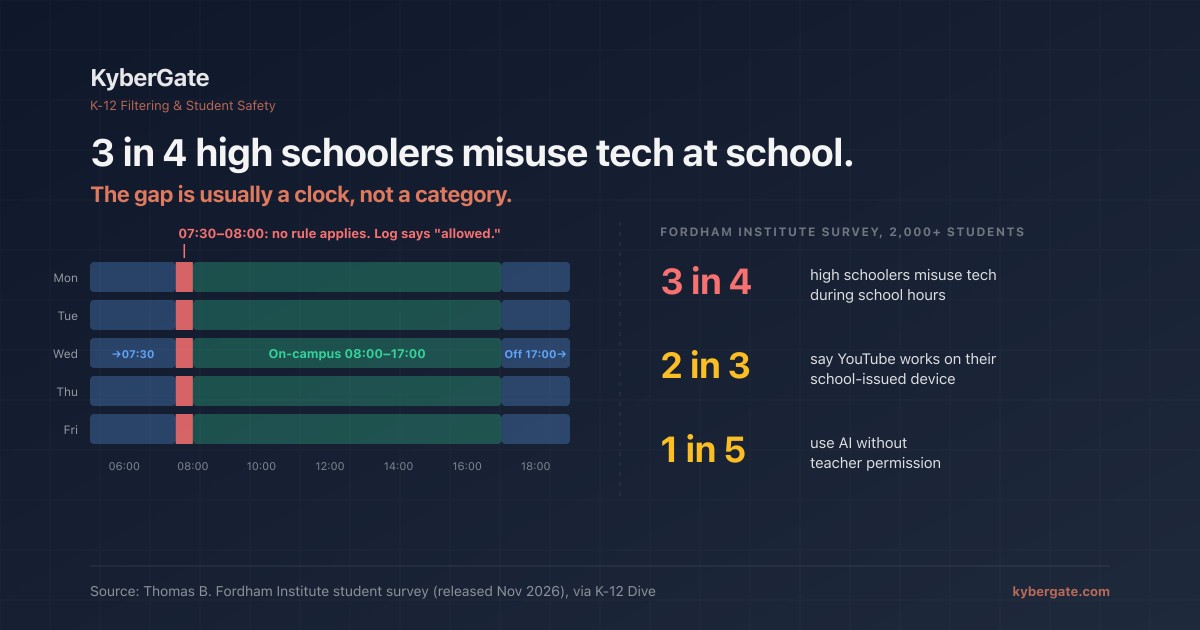
On November 11, the Thomas B. Fordham Institute published a survey of more than 2,000 high school students and recent graduates. The headline: just over three-quarters of high schoolers say they misuse technology during school hours.
Most of the coverage went to phones and AI cheating. The line that matters to an IT director is quieter. Fordham wrote that "school-issued devices provide direct access to the platforms driving it." Two-thirds of students said YouTube works on their school device.
Phone bans move students onto the device you hand them. If that device is where the distraction lives, the ban did not remove it. It moved it into your filter's lane.
| Fordham survey finding (released Nov 2026) | Result |
|---|---|
| High schoolers who misuse tech during school hours | **Just over 3 in 4** |
| Use AI without teacher permission | About 1 in 5 |
| Use school-day tech for social media | Over 50% |
| Use it for games or off-task YouTube | About 1 in 3 |
| Say YouTube is reachable on their school device | **About 2 in 3** |
| Spend more than half of class time on school devices | 62% |
Source: Thomas B. Fordham Institute survey, fielded February to March 2026, as reported by K-12 Dive on November 11, 2026.
The recommendation everyone will agree with
Fordham's list for schools includes this: "Ensure there are firewalls on school-issued devices and put guardrails in place to prevent off-task technology use."
Nobody will argue with that in a board meeting. The trouble is that most districts already believe they have done it. They have a filter. It has a YouTube setting. It has a games category. The policy screen looks finished.
So why does two-thirds of a national sample still reach YouTube?
Some of it is deliberate. Teachers use YouTube, and a blanket block costs real instruction. But some of it is a gap between what the policy screen shows and what the device enforces at a given minute. Those gaps are hard to see because the logs look healthy.
Where off-task guardrails quietly fail
Off-task rules are almost always time-based. Games blocked during class, open at lunch. YouTube restricted 8 to 3, looser after. Time is exactly where filters break without telling anyone.
We know because we found these in our own product this fall.
1. The 30-minute hole between two schedules. A school set up two policies: on-campus 08:00 to 17:00, off-campus 17:00 to 07:30. It reads as full coverage. It is not. From 07:30 to 08:00 every weekday, neither rule applied. That is homeroom. Nothing in the logs flagged it, because "no rule matched" is not an error. We fixed it in September (#448) and now show coverage gaps on the policy screen, walked minute by minute across the whole week.
2. Server time instead of school time. If a school had a schedule but no timezone saved, the old code fell back to the server's clock. Servers run on UTC. An 8:00 to 5:00 Eastern window quietly ran as 4:00 to 1:00 Eastern. The school's afternoon was unfiltered and every dashboard looked fine. Saving a schedule now requires a timezone, and schools without one were flagged.
3. The student's own clock. Our Chromebook extension used to decide "is it school hours?" from the device clock. A student who changed the clock could move themselves outside school hours. Fixed in September (#449): the server now sends the schedule decision, and if it is missing the extension keeps filtering. Unknown is treated as school hours.
None of these show up as a "block failed" event. A student opens a game at 7:45, the filter allows it, and the log says "allowed." The policy screen still says games are blocked during school hours.
If we had these, assume your filter has some version of them until you test it.
Phone bans make this more urgent, not less
Fordham also found students used social media least where phones were fully put away, in a pouch or at the office. Brookings found in September that phone-ban enforcement tends to fade over the year as teachers tire of policing it.
Put those together. The stricter and more durable your phone policy, the more of the school day runs through the device you issued. Our phone-free schools guide covers that shift. This post is about the part that is easiest to get wrong: time.
Three checks to run this week
These take under an hour on one real student device. Do them on a device in a student account, not your admin account.
Check 1: Walk the whole week, not just class hours. Print your schedules and lay them on a 7-day, 24-hour grid. Look for any minute where no rule applies: before first bell, passing periods, early-release days, the minute one window ends and the next begins. Then test one blocked game site at 7:45 a.m. and at the exact minute one schedule hands off to the next. If your filter cannot show you a coverage view, the grid is the only way you will find a hole.
Check 2: Confirm whose clock the filter trusts. On a test Chromebook in a student account, change the device's time zone or clock so it reads after school hours. Reload a site that should be blocked during class. If it opens, the filter is trusting the student's clock. Also confirm your filter has your school's time zone saved, not a default.
Check 3: Test the off-task list, not just the category. Pick the five things your students actually use off-task. Fordham's list is a good start: one social site, one messaging site, one browser game, YouTube, and one AI tool. Open each one during class hours on a student device. Record what happened and what the policy screen claims. Any mismatch is a guardrail that exists only on paper.
Put the results in the same table as your other filter tests. Our filter audit post has a template. For YouTube rules that do not mean blocking it outright, see our YouTube guide. For games specifically, see how unblocked game sites get past filters.
What filtering cannot fix
A filter is one item on Fordham's list, not the whole list. It does not fix grading practices that reward finished work over learning. It does not decide how many minutes a day students should spend on a screen. A student who is bored will find something off-task that no filter catches, including a notebook margin.
What a filter can do is make the policy you wrote true at every minute of the week. That is a narrow job. Most districts have never checked whether theirs does it.
Want to see your own coverage gaps?
KyberGate filters through a cloud proxy with full HTTPS inspection, so the same policy holds on iPads and Chromebooks at school and at home. Schedule decisions come from our servers, not the student's device, and the policy screen shows every minute of the week where no rule applies.
Start a free 30-day pilot. We will run all three checks with you on your own devices.
Frequently Asked Questions
What did the Fordham Institute survey find about student tech use?
Fordham's survey of more than 2,000 high school students and recent graduates, released in November 2026, found that just over three in four high schoolers misuse technology during school hours. About one in five use AI without teacher permission, over half use school-day tech for social media, and about two-thirds say YouTube is reachable on their school-issued device.
Why do school-issued devices matter if phones are banned?
A phone ban moves student internet use onto the device the school issues. Fordham found school-issued devices provide direct access to the platforms driving off-task use, so the filter on that device becomes the main guardrail.
What is a schedule coverage gap in a web filter?
A coverage gap is any minute of the week where no filter rule applies. For example, an on-campus policy from 08:00 to 17:00 and an off-campus policy from 17:00 to 07:30 leave 07:30 to 08:00 uncovered every weekday. Filters usually log that time as allowed, not as an error.
Can students bypass school-hours filtering by changing the device clock?
They can if the filter decides school hours from the device clock. Test it by changing the clock or time zone on a student-account Chromebook and reloading a site that should be blocked. A safer design takes the schedule decision from the server and keeps filtering when that decision is missing.
How do I test whether my off-task guardrails work?
Lay all schedules on a 7-day, 24-hour grid and look for uncovered minutes, test a blocked site at 7:45 a.m. and at each schedule handoff, try a device clock change, and open your students' five most common off-task sites during class on a student device. Compare each result to what the policy screen claims.
Can a web filter stop all off-task behavior?
No. A filter can make the written policy true at every minute of the week, but it does not change grading practices, total screen time, or student motivation. Fordham lists device guardrails as one recommendation among several.
Ready to protect your students?
Deploy KyberGate in under 30 minutes. No hardware required.